Scheduled Payouts
The Scheduled Payouts feature lets you adjust affiliate commission rates based on time. You can set a specific date on which the new commission rates (payouts) will take effect.
How to schedule payouts?
First, create the new payout or payout group you want to apply to the affiliate once the scheduled date arrives. Be sure to set them as ‘Personal Payout’ types, so affiliates won’t see these payouts until they take effect.
Once you’ve created the commission rates you want to schedule, the next step is to set up the schedule itself.
Navigate to Affiliates → Management → Click on the relevant affiliate's name → Payout Group Settings tab → Schedule tab Navigate to Affiliates → Management → Click on the relevant affiliate's name → Payout Group Settings tab → Add New
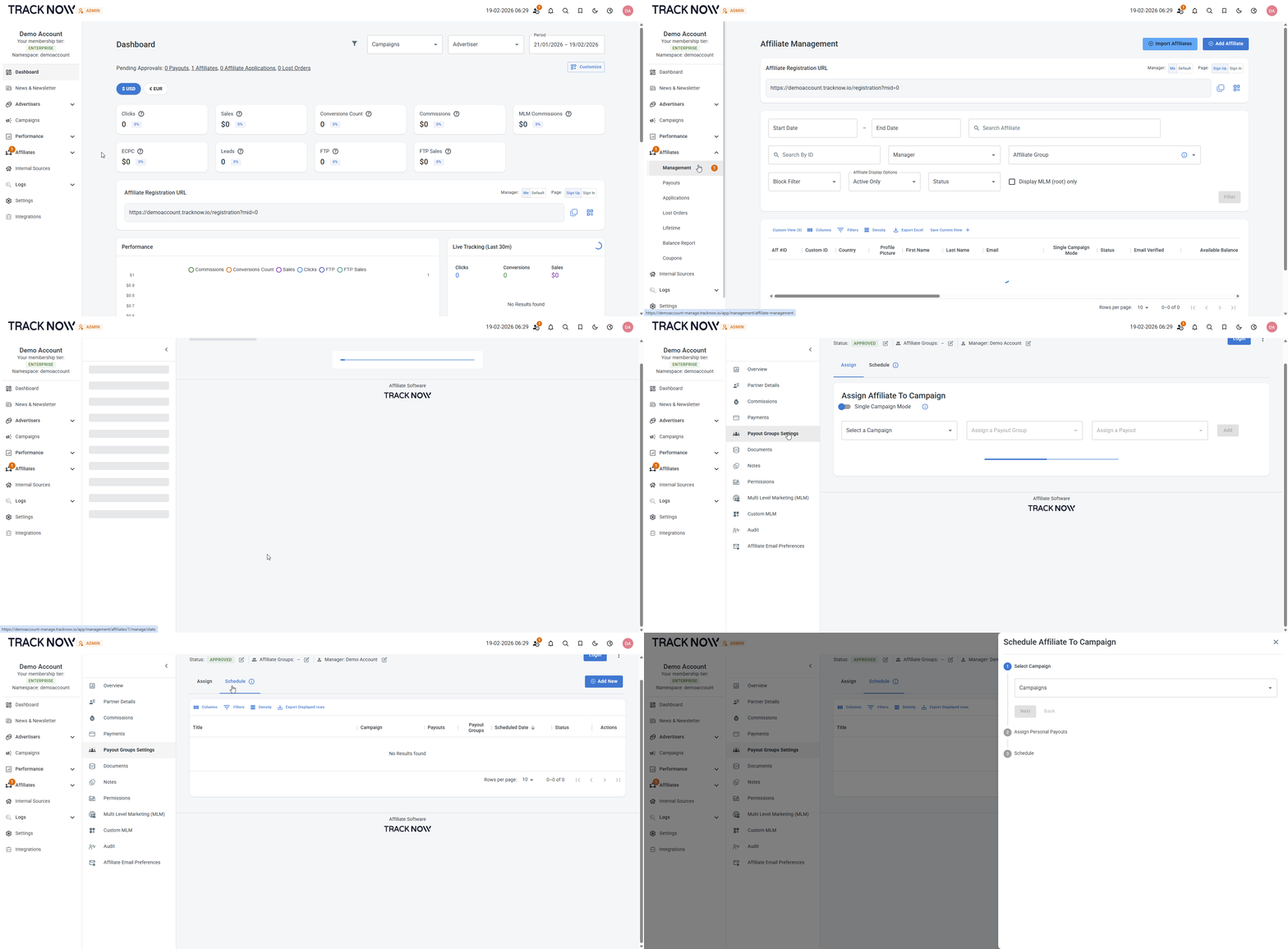
- Select the relevant campaign that the payout rates will change in
- Select the future payout that you previously created
- Set the schedule date
- Save