# Tracking URL Passed Parameters

Each [landing page](https://docs.tracknow.io/campaigns/landing-pages) you create in Tracknow automatically generates a unique tracking URL for every affiliate with access to that page.

Affiliates use this URL to promote the landing page by sharing it across their channels. When a user clicks the tracking link, they are redirected to the corresponding landing page.

By default, the tracking URL looks like this:

```
https://{YOUR NAMESPACE}-tracking.tracknow.info/click?campaign_id={VALUE}&ref_id={VALUE}
```

You can also setup a [custom sub-domain](https://docs.tracknow.io/customizations/custom-domain) so that tracking URLs will appear from your domain, for example:

```
https://example.yourdomain.com/click?campaign_id={VALUE}&ref_id={VALUE}
```

***

### Default Parameters

Tracking URLs always include the following parameters:

* `campaign_id` – identifies the Tracknow campaign associated with the landing page
* `ref_id` – identifies the specific affiliate link that was clicked

When a user clicks on the tracking URL, Tracknow generates a click record and stores these parameters on that click record.

Whenever a conversion postback is sent to our system indicating a specific `click_id` (a click record identifier), the conversion attribution is based on these parameters.

* The `campaign_id` value will determine under which campaign this conversion will be added
* The `ref_id` value will determine which affialite will receive the commission for that conversion.

Click records can be seen on your Tracknow dashboard under **Logs** → **Clicks**

***

### Additional Parameters

You can also append additional parameters to a tracking URL, which will be captured and stored with the click record.

When a conversion is later reported via postback using the corresponding `click_id`, it inherits all parameters associated with that click, including any custom values passed in the original tracking URL.

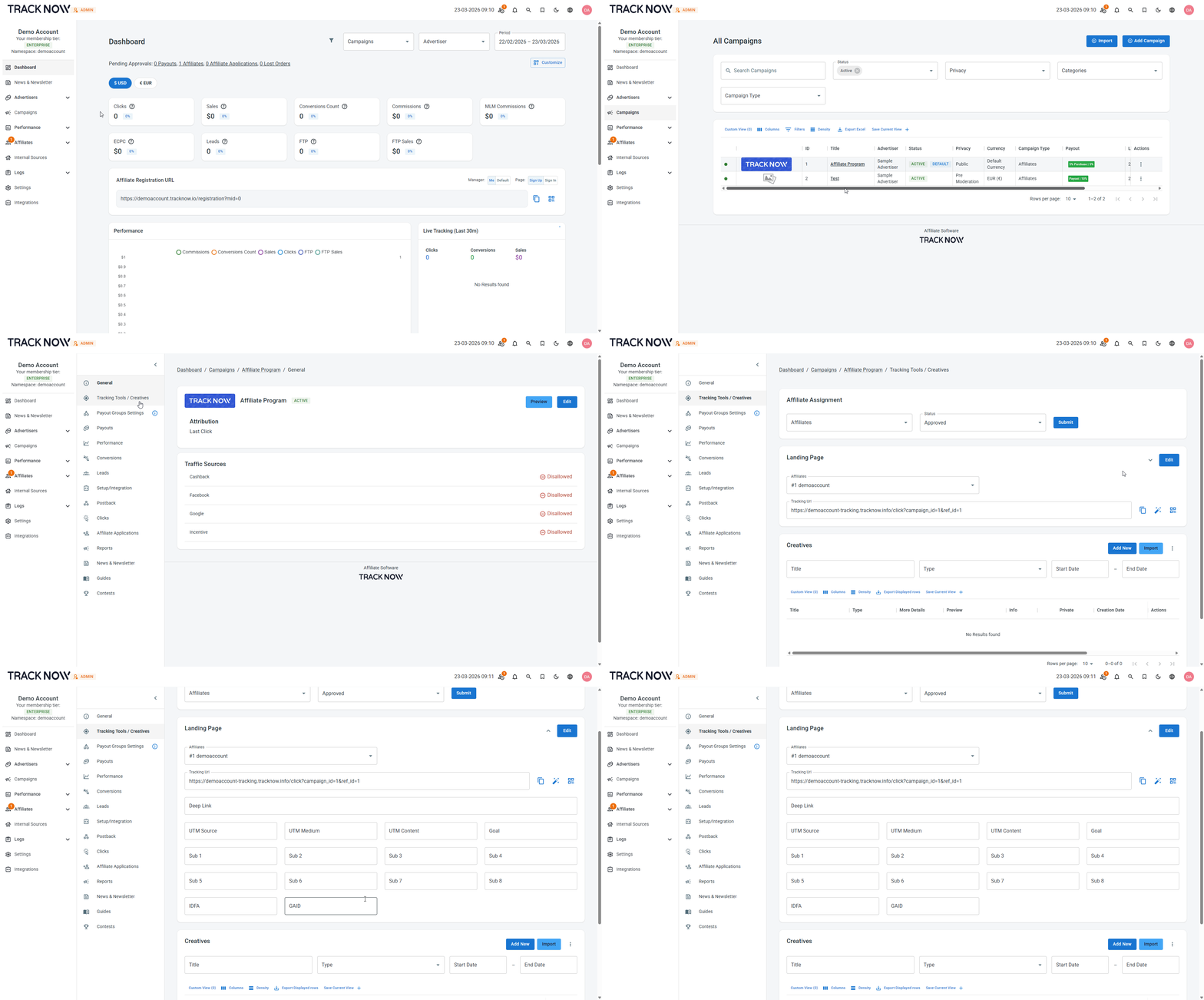
Navigate to **Campaigns** → Click on the name of the relevant campaign → **Tracking Tools / Creatives** → **Landing Page** section → Click the small **arrow** at the top right corner to reveal supported parameter keys

<figure><img src="https://1097958070-files.gitbook.io/~/files/v0/b/gitbook-x-prod.appspot.com/o/spaces%2FHX682uo79XLNkfkN58br%2Fuploads%2FdnvvhsJhvpa4QgQ25vYm%2Fchrome_T7MGrxi8x5.gif?alt=media&#x26;token=8248787f-f465-4b9a-86c5-a5f279770a01" alt=""><figcaption></figcaption></figure>

<table><thead><tr><th width="154">Field</th><th width="144">Parameter Key</th><th>Description</th></tr></thead><tbody><tr><td>UTM Source</td><td>utm_source</td><td>Google Analytics dedicated parameter. Used to pass a UTM Source value</td></tr><tr><td>UTM Medium</td><td>utm_medium</td><td>Google Analytics dedicated parameter. Used to pass a UTM Medium value</td></tr><tr><td>UTM Content</td><td>utm_content</td><td>Google Analytics dedicated parameter. Used to pass a UTM Content value</td></tr><tr><td>Goal</td><td>goal</td><td>Allows you to pass a <a href="https://docs.tracknow.io/payouts/goal-based-payouts">goal value</a> that is stored with the click record. When a conversion postback is later received with the corresponding <code>click_id</code>, the system uses this stored goal value to trigger the payout configured for that specific goal.</td></tr><tr><td>Sub 1</td><td>sub1</td><td>A parameter for any text or values you want to pass that don’t have a dedicated parameter</td></tr><tr><td>Sub 2</td><td>sub2</td><td>A parameter for any text or values you want to pass that don’t have a dedicated parameter</td></tr><tr><td>Sub 3</td><td>sub3</td><td>A parameter for any text or values you want to pass that don’t have a dedicated parameter</td></tr><tr><td>Sub 4</td><td>sub4</td><td>A parameter for any text or values you want to pass that don’t have a dedicated parameter</td></tr><tr><td>Sub 5</td><td>sub5</td><td>A parameter for any text or values you want to pass that don’t have a dedicated parameter</td></tr><tr><td>Sub 6</td><td>sub6</td><td>A parameter for any text or values you want to pass that don’t have a dedicated parameter</td></tr><tr><td>Sub 7</td><td>sub7</td><td>A parameter for any text or values you want to pass that don’t have a dedicated parameter</td></tr><tr><td>Sub 8</td><td>sub8</td><td>A parameter for any text or values you want to pass that don’t have a dedicated parameter</td></tr><tr><td>IDFA</td><td>idfa</td><td>IDFA is a random device identifier assigned by Apple to a user’s iOS device</td></tr><tr><td>GAID</td><td>gaid</td><td>Google Analytics dedicated parameter. Used to pass a Google Advertising ID value</td></tr></tbody></table>