Stripe Integration (Payment Link)
If your webstore uses Stripe as your payment processing platform, you are able to track the purchases and view them directly on your Tracknow dashboard after integration.
Prerequisites
This integration method require you to enable passing our unique affiliate identifier click_id to your landing page.
For instructions, click here.
Storing the click_id
Add a script on every page of your website to store this parameter.
In order to store the click_id parameter, you will need to implement the following code on all of the pages of your website:
(function() {
    const v = new URLSearchParams(window.location.search).get("click_id");
    if (!v) return;

    const d = new Date();
    d.setTime(d.getTime() + (365 * 24 * 60 * 60 * 1000));

    document.cookie = `tn_click_id=${encodeURIComponent(v)}; expires=${d.toUTCString()}; path=/; Secure; SameSite=Lax`;
    localStorage.setItem('tn_click_id', v);
})();
This code will ensure that no matter which page of your website the client will land on, the click_id parameter will be saved and stored.
Adding the Stored click_id to the Payment Link
Since the stripe payment page is not on the same domain as your website, the click_id parameter will not be available by default and we’ll need to manually transfer it to the payment page as well.
This can be achieved by adding the following code to every page that links to the Stripe payment page:
(function() {
  function getCookie(name) {
    let cookieArr = document.cookie.split(";");
    for (let i = 0; i < cookieArr.length; i++) {
      let cookiePair = cookieArr[i].split("=");
      if (name.trim() === cookiePair[0].trim()) {
        return decodeURIComponent(cookiePair[1].trim());
      }
    }
    return null;
  }

  function updatePaymentLinks() {
    let clickId = getCookie("tn_click_id") || localStorage.getItem('tn_click_id');
    if (!clickId) return;

    document.querySelectorAll('a[href^="https://buy.stripe.com"]').forEach(paymentLink => {
      let url = new URL(paymentLink.href);
      url.searchParams.set('client_reference_id', clickId); // Automatically handles "?" or "&"
      paymentLink.href = url.toString();
    });
  }

  updatePaymentLinks();
})();
This code will check if there is a stored click_id parameter and if it found one, it will append it to the payment link itself as client_reference_id.
Sending Data from Stripe to Tracknow When a Purchase is Completed
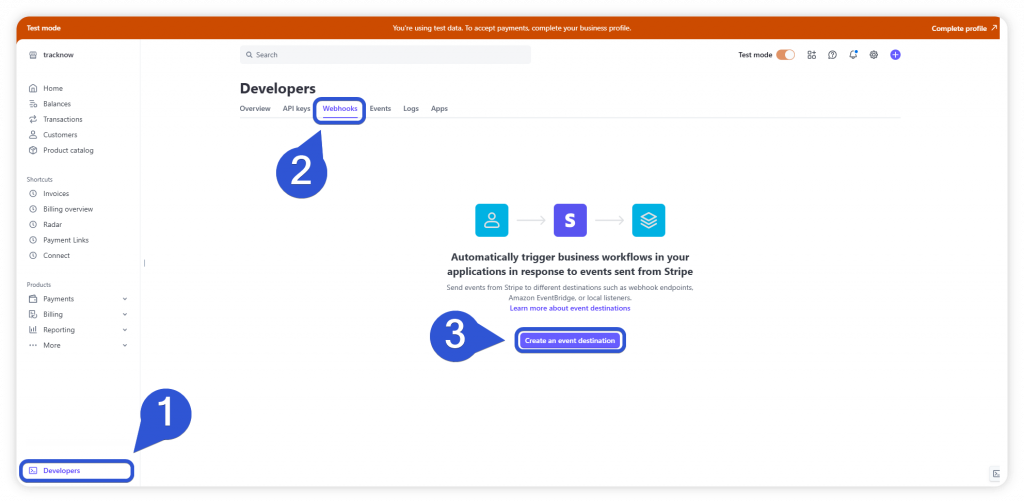
- Login to your Stripe account and click the ‘Developers’ screen
- Navigate to the ‘Webhooks’ tab
- Click ‘Create an event destination’
- In the ‘Endpoint URL’ field fill out your Tracknow Stripe Webhook URL:
https://{NAMESPACE}-tracking.tracknow.info/stripe/postback(Use your actual Tracknow namespace in place of{NAMESPACE}. You can find it in the main menu of the Tracknow dashboard.) - Under ‘Select events to listen to’, select ‘charge.succeeded’ & ‘checkout.session.completed’
- Click ‘Add endpoint’
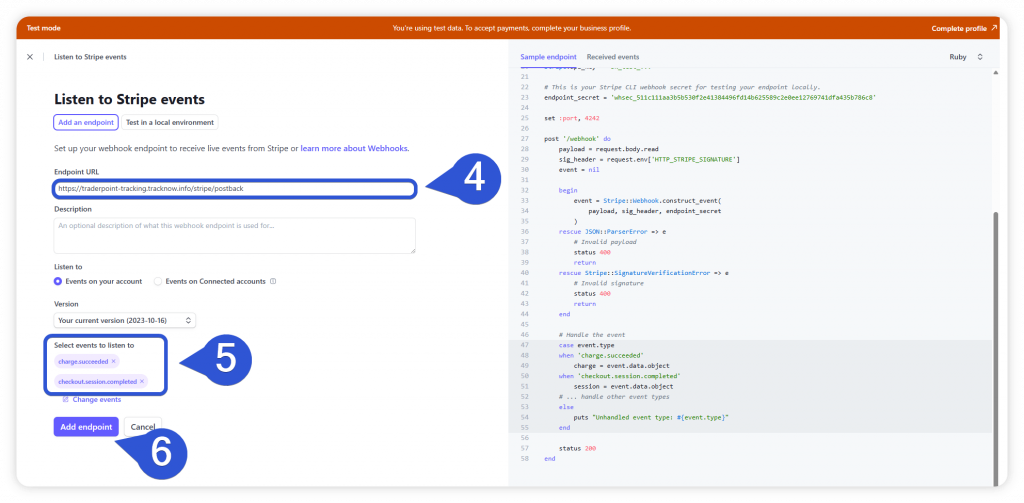
This setup will look for events such as successfully completed payments and checkouts and when an event like that occurs, Stripe will automatically send the purchase data to your Tracknow dashboard via the Webhook URL you inserted.