Postback Integration
In short: When a customer places an order, your server calls a postback URL that carries the order details. Tracknow identifies the campaign, the affiliate and the payout, then creates a conversion and calculates the commission. If any of the three can't be identified, no conversion is created.
What is a postback?
A postback is a URL your server calls to tell Tracknow that an event happened, such as a purchase. The event details, such as the order ID and amount, are added to the URL as parameters.
Postbacks are sent server to server: from your backend or e-commerce platform directly to Tracknow. The customer's browser isn't involved, so ad blockers and cookie restrictions don't affect them.
Why it matters: Tracknow doesn't see your store's orders. It learns about a sale only from your postback. Without postbacks, no conversions are created and affiliates earn no commissions.
How does Tracknow know which affiliate referred an order?
Through attribution: the postback carries an identifier that links the order to an affiliate. Tracknow supports three attribution methods. Use the ones your affiliate program offers; a postback can carry more than one identifier.
| Method | When the affiliate gets credit | Identifier in the postback | Setup in Tracknow |
|---|---|---|---|
| Link attribution | The customer reached your site through the affiliate's tracking link. | click_id | Pass the click_id to your landing page and save it in a cookie. |
| Coupon attribution | The customer used a coupon code assigned to the affiliate, even without clicking a link. | coupon | Create the coupon code and assign it to an affiliate and a campaign. |
| Lifetime attribution | A returning customer was linked to the affiliate on their first order. No link or coupon needed. | customer_id | Add a lifetime payout to the campaign. |
You can also credit an affiliate directly with ref_id or ref_custom_id.
Link attribution: how the click_id reaches the postback
- A customer clicks an affiliate's tracking link.
- Tracknow records the click, gives it a unique
click_idand redirects the customer to your website with it in the URL, for exampleyourstore.com/?click_id=abc123. - Your website saves the click_id in a cookie.
- The customer completes a purchase.
- Your server sends a postback that includes the click_id from the cookie.
Lifetime attribution: how the lifetime link is created
- A new customer places their first order, attributed to an affiliate by link or coupon.
- The postback includes
customer_id(for example, their email) andnew_customer=true. - Tracknow links that customer to the affiliate for life, within that campaign.
- Every later postback with the same
customer_idcredits that affiliate, even without a click_id or coupon.
How does Tracknow turn a postback into a conversion?
Every postback is first recorded under Logs > Postbacks, exactly as received. Tracknow then resolves three things in order. If any one can't be resolved, the postback fails and no conversion is created.
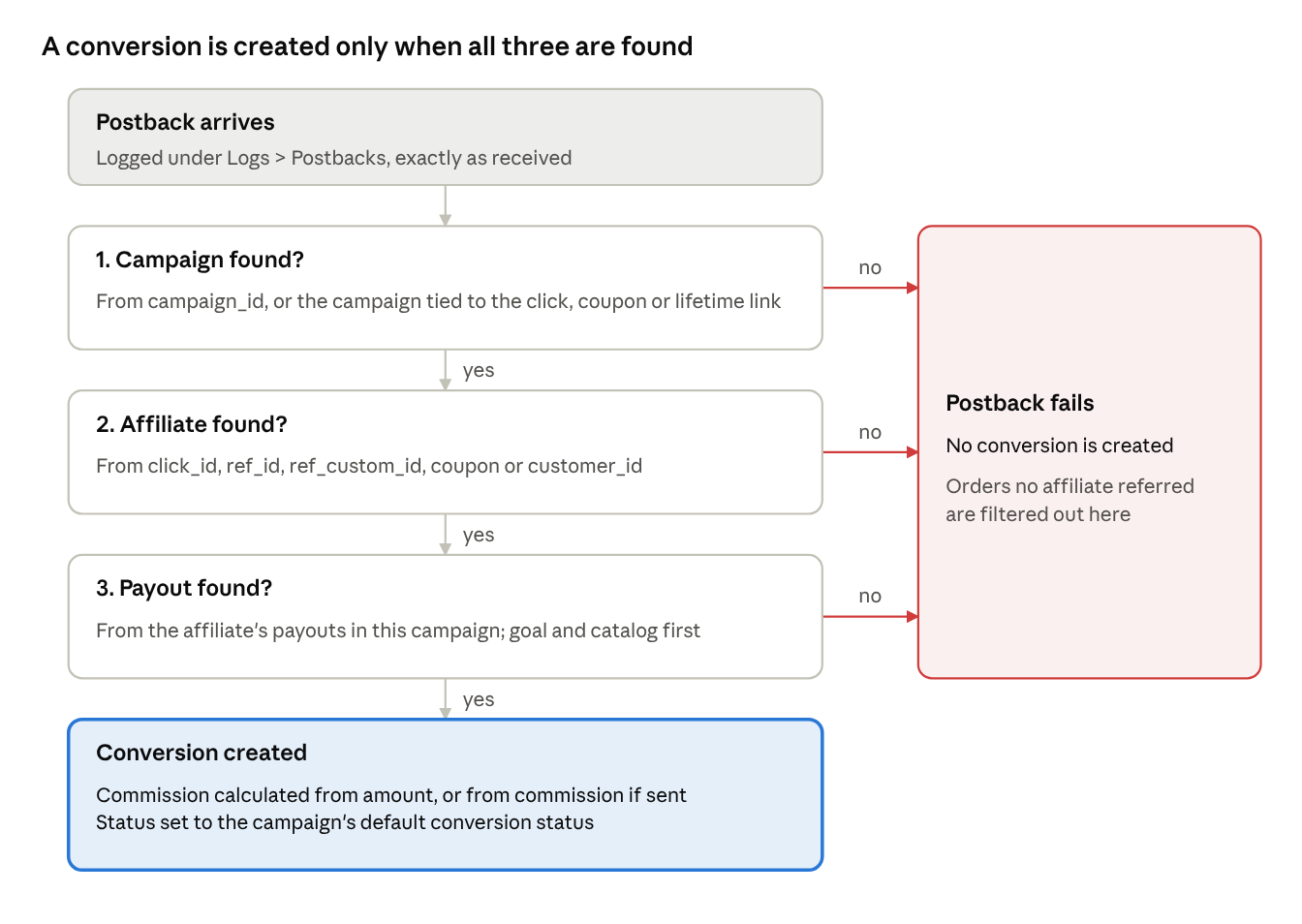
| Step | Tracknow resolves | Based on |
|---|---|---|
| 1 | Campaign the event belongs to | campaign_id, or the campaign tied to the click, the coupon or the lifetime link |
| 2 | Affiliate who referred the event | click_id (link), coupon (coupon), customer_id (lifetime link), or ref_id / ref_custom_id |
| 3 | Payout used to calculate the commission | The affiliate's payouts in that campaign (see below) |
When all three are resolved, Tracknow creates the conversion:
- Commission is calculated from
amount, or fromcommissionif you sent it, and converted to the campaign currency if needed. - Status comes from the campaign's Default Conversion Status setting (Campaign → Edit → Tracking).
How is the payout chosen?
- Tracknow pulls all payouts available to the affiliate in the campaign.
- If the postback contains payout identifiers, such as a
goalvalue or items (itemId) from a catalog, Tracknow searches for payouts that match them first. - The matching payout is used to calculate the commission.
Important: Give every payout a unique goal value. If two payouts match the same event, for example two payouts with
goal=salepaying 10% and 20%, Tracknow can't tell which one is intended and uses the first one it pulls.
Orders no affiliate referred are filtered out automatically
You can send a postback for every order in your store. Orders with a valid attribution identifier (a click_id, an assigned coupon code or a lifetime-linked customer_id) become conversions. Orders without one fail and are ignored, so your store doesn't need its own logic to detect referred orders.
Before you start
- Set up your attribution methods:
- Link attribution: pass the click_id to your website, as described in Passing click_id to a Landing Page.
- Coupon attribution: create coupon codes in Tracknow and assign each to an affiliate and a campaign. See Coupons.
- Lifetime attribution: add a lifetime payout to the campaign. See Lifetime Payout.
- Find your namespace. It's shown in the main menu of your Tracknow dashboard and is part of your postback URL.
- Check your campaign's payouts. If they use goals or catalogs, you'll need to send extra parameters.
Step 1: Build your postback URL
A postback URL is your account's base URL followed by parameters that carry the event details. Replace {namespace} with your namespace:
https://{namespace}-tracking.tracknow.info/postback
Then add parameters. Example for the namespace acme:
https://acme-tracking.tracknow.info/postback?click_id=abc123&order_id=1001&amount=49.90
| Part | Example | Meaning |
|---|---|---|
| Base URL | https://acme-tracking.tracknow.info/postback | Your account's postback address. The same for every postback. |
? | ? | Starts the parameters. Used once, after the base URL. |
| Parameter | order_id=1001 | One detail, written as name=value. |
& | & | Separates parameters. |
Parameters can be in any order.
Step 2: Add the order details
Put each detail in its dedicated parameter, filled with the real value from the order. Example: order 1001, paid $49.90 in USD with the coupon SUMMER10, by Jane ([email protected]):
https://acme-tracking.tracknow.info/postback?click_id=abc123&order_id=1001&amount=49.90¤cy=USD&coupon=SUMMER10&first_name=Jane&email=jane%40example.com
Which parameters should I send?
Every postback needs at least one attribution identifier. Send every identifier you have for the order; Tracknow uses whichever one it can match.
| Parameter | When to send it |
|---|---|
click_id | Link attribution. The value saved in the customer's cookie, if there is one. |
coupon | Coupon attribution. The coupon code the customer used, if any. |
customer_id | Lifetime attribution. The same customer value on every order, such as their email. |
new_customer | Lifetime attribution. true on the customer's first order, otherwise false. |
order_id | Every sale. Your store's order number. |
amount | Every sale. Percentage commissions are calculated from it. |
currency | If you sell in more than one currency. |
campaign_id | If your integration type requires it. |
goal | If your campaign uses goal-based payouts. |
itemId and other item fields | If your campaign uses catalog-based payouts. |
All other parameters are optional. See the full list in the Parameter reference at the end of this guide.
Rules for parameter values
- Use the dedicated parameter. The order total goes in
amount, not incustom1, or commissions won't be calculated correctly. - Spell names exactly as listed:
order_id, notorderIdorOrderID. - Send real values. Replace placeholders such as
{order_id}with real values before sending; otherwise the placeholder text itself is sent. - Send amounts as plain numbers with a dot for decimals:
49.90, not$49.90or1,049.90. - Use standard codes: 3-letter currency codes (
USD,EUR) and 2-letter country codes (US,GB). - URL-encode values. Spaces,
@,&and#must be encoded, for example[email protected]becomesjane%40example.com. Most programming languages have a built-in function for this. - Leave out parameters you don't have instead of sending them empty.
Step 3: Send the postback at the right moment
Rule: Send one postback per order, from your server, right after the payment succeeds.
| Send a postback | Don't send a postback |
|---|---|
| When the payment succeeds | When a product is added to the cart or checkout starts |
Once per order, with that order's order_id | When a payment fails or is declined |
| For each other tracked action, such as a completed sign-up | Again for the same order, for example on retries or status updates |
| From your server or e-commerce platform | From the thank-you page in the browser, where refreshes cause duplicates and ad blockers can block it |
If an order is later refunded or canceled, don't send another postback. Change the conversion's status in your dashboard instead (Conversion Status).
Step 4: Test your integration
- Place a test order using each attribution method you support:
- Link: open an affiliate tracking link, check that the landing page URL contains
click_id=, then buy. - Coupon: buy using a coupon code assigned to an affiliate.
- Lifetime: place a first order as a new customer, then a second order with the same
customer_idand no link or coupon.
- In Tracknow, open Logs > Postbacks and confirm each postback arrived with the expected parameters.
- Open your conversions report, find each order by its Order ID, and check the affiliate, amount and commission.
Troubleshooting: why didn't my postback create a conversion?
| What you see | Likely cause | Fix |
|---|---|---|
| Nothing in Logs > Postbacks | The postback wasn't sent, or the base URL has the wrong namespace. | Check your server logs and the namespace in your dashboard menu. |
| Postback in the logs, but no conversion | Tracknow couldn't resolve the campaign, the affiliate or the payout. | Check that the postback has an attribution identifier (click_id, coupon or customer_id) with a real value, and that a matching payout exists. Expected for orders no affiliate referred. |
| Coupon order not attributed | The coupon code isn't set up in Tracknow or isn't assigned to an affiliate and campaign. | Create the coupon in Tracknow and assign it. |
| Repeat order not attributed (lifetime) | No lifetime link exists, or customer_id differs from the first order. | Send new_customer=true on the first order and the same customer_id every time. |
| Commission is 0 or wrong | The order total is missing from amount, or includes a symbol or comma. | Send the total as a plain number, such as 49.90. |
| Commission uses an unexpected payout | Two payouts match the event, for example with the same goal value. | Give each payout a unique goal value. |
| Wrong converted amount | currency is missing. | Add the 3-letter currency code. |
| Same order appears twice | The postback is sent more than once. | Send it from the server, once per paid order. |
Text like {order_id} in a column | A placeholder wasn't replaced. | Fill in every value before sending. |
Parameter reference
All parameters a postback can include, grouped by purpose. "Dashboard column" is where the value appears in your conversions report; — means the value is used for processing only. Source: Supported Parameters.
Attribution and campaign identifiers
| Parameter | Dashboard column | What to send |
|---|---|---|
click_id | Click ID | Link attribution: the click_id saved in the customer's cookie. |
coupon | Coupon code | Coupon attribution: the coupon code the customer used. Works without a click_id when the coupon is assigned to an affiliate and campaign in Tracknow. |
customer_id | — | Lifetime attribution: a value that identifies the customer every time, such as their email. |
campaign_id | Campaign/Offer | Your Tracknow campaign ID. Required in some integrations. |
ref_id | Affiliate | A Tracknow Affiliate ID, to credit a specific affiliate directly. |
ref_custom_id | Affiliate | The affiliate's custom ID, if you use custom IDs instead of ref_id. |
Order details
| Parameter | Dashboard column | What to send |
|---|---|---|
order_id | Order ID | Your store's order number. |
amount | Amount | The amount the customer paid. Percentage commissions are calculated from this. |
commission | — | A custom value to base the commission on, instead of amount. |
currency | — | 3-letter currency code (USD, EUR). Tracknow converts the amount to your campaign's currency. |
conversion_rate | — | Your own exchange rate, if you don't want Tracknow's default rate. |
goal | — | A value that triggers a specific payout. See Goal-Based Payouts. |
comment | Comment | Any note about the order. |
Customer details
| Parameter | Dashboard column | What to send |
|---|---|---|
first_name | First Name | Customer's first name |
last_name | Last Name | Customer's last name |
email | Customer's email address | |
phone | Phone number | Customer's phone number |
address | Address | Customer's address |
postcode | Postcode | Customer's postcode |
country | Country | 2-letter country code (US, GB, JP) |
Lifetime payouts
Use these if your campaign has a lifetime payout. Send customer_id too (listed above).
| Parameter | What to send |
|---|---|
new_customer | true if this is the customer's first order, otherwise false. A lifetime link is only created for new customers. |
skip_lifetime | true to create the lifetime link but pay this order through a different payout. |
Products (catalog-based payouts)
Use these if commissions depend on the product bought. See Catalogs.
| Parameter | What to send |
|---|---|
itemId | The product ID or SKU. Required for catalog-based payouts. |
itemName | Product name |
itemVariation | Product variation, such as size or color |
itemQuantity | Number of units bought |
itemPrice | Price of the product |
Mobile apps and extra data
| Parameter | Dashboard column | What to send |
|---|---|---|
gaid | GAID | Google advertising ID (Android) |
idfa | IDFA | Apple advertising ID (iOS) |
custom1 – custom8 | custom1 – custom8 | Any extra information that has no dedicated parameter. |
sub1 – sub8 | sub1 – sub8 | Extra information. Affiliates can use these too, and your value replaces theirs. |