AppsFlyer Integration for Partners
This guide explains how to set up AppsFlyer mobile attribution with Tracknow, so installs and in-app events can be attributed to the correct affiliate, campaign, and click.
AppsFlyer is a Mobile Measurement Partner, MMP, used by mobile apps to track installs, in-app events, and attribution data. This data can be sent to Tracknow using AppsFlyer attribution links and postbacks.
Overview
This article is intended for partners who want to:
- Work with AppsFlyer for the first time
- Migrate an advertiser to AppsFlyer
- Track mobile app installs through Tracknow
- Track in-app events such as registrations, purchases, deposits, subscriptions, or custom events
- Receive AppsFlyer postbacks in Tracknow
The basic tracking flow is:
- The user clicks a Tracknow affiliate tracking link.
- Tracknow redirects the user to the AppsFlyer attribution link.
- AppsFlyer tracks the app install or in-app event.
- AppsFlyer sends a postback to Tracknow.
- Tracknow attributes the conversion to the correct affiliate and campaign.
Integrating with AppsFlyer
Initiating a New AppsFlyer Integration
To start a new AppsFlyer integration, the advertiser must invite you, the partner, to integrate with AppsFlyer.
This step is handled inside the advertiser’s AppsFlyer account.
The advertiser should follow AppsFlyer’s official partner integration instructions and invite your partner account in AppsFlyer before traffic starts running.
Reference: AppsFlyer Help Center
This is required so AppsFlyer can recognize you as the partner and allow attribution links, install postbacks, and in-app event postbacks to be configured correctly.
Updating an Existing AppsFlyer Integration
If you need to update an existing AppsFlyer integration, send an email request to:
Most integration update requests are usually completed within 2 business days.
Creating the Campaign in Tracknow
In Tracknow, create a campaign for the mobile app.
Go to:
Admin Panel → Campaigns → Add Campaign
Recommended setup:
| Field | Recommended Value |
|---|---|
| Campaign Type | Mobile App |
| Tracking Type | Redirect |
| Conversion Method | Server Postback |
| Default Landing Page | AppsFlyer Attribution Link |
| Goals | Install, Registration, Purchase, First Deposit, or custom events |
The campaign default landing page should be the AppsFlyer attribution link with Tracknow macros included.
Creating the Default Landing Page Using an AppsFlyer Attribution Link
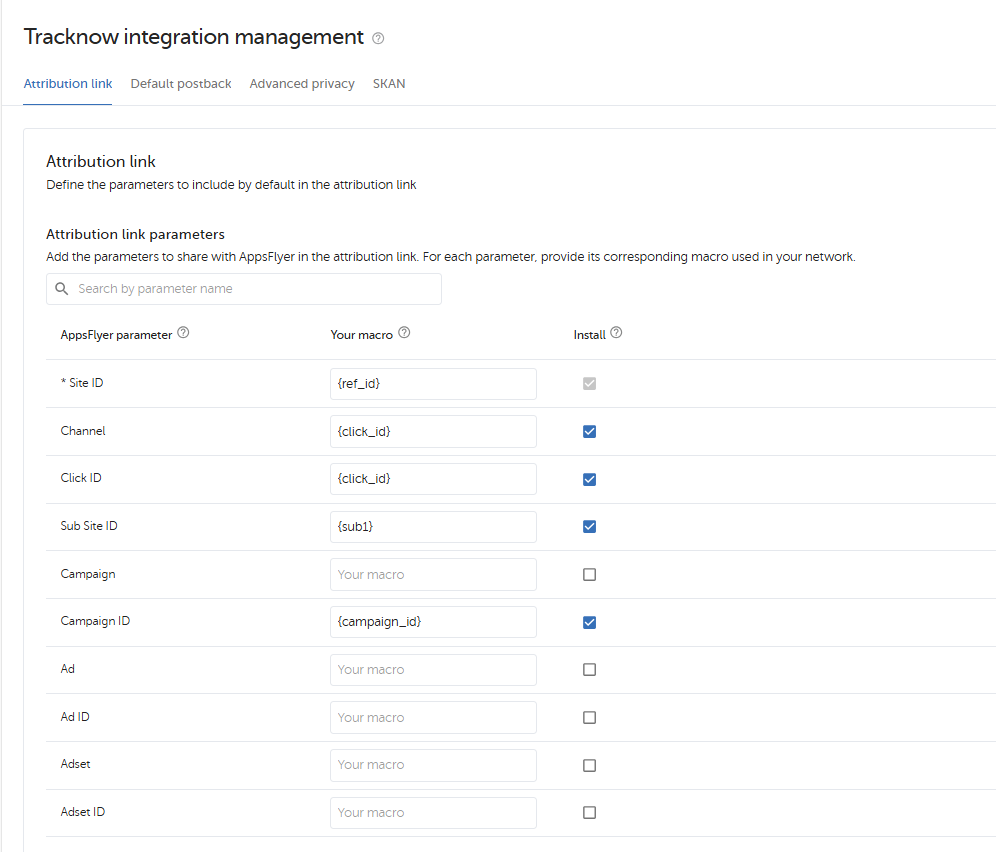
Partner Screen Attribution (Your App)
You will need the following values from AppsFlyer:
- AppsFlyer App ID
- Your AppsFlyer Partner ID, PID
- Required tracking parameters
Example AppsFlyer attribution link:
https://app.appsflyer.com/[APP_ID]?pid=[APPSFLYER_PID]&af_siteid={ref_id}&af_channel={click_id}&clickid={click_id}&af_c_id={campaign_id}&af_sub_siteid={sub1}
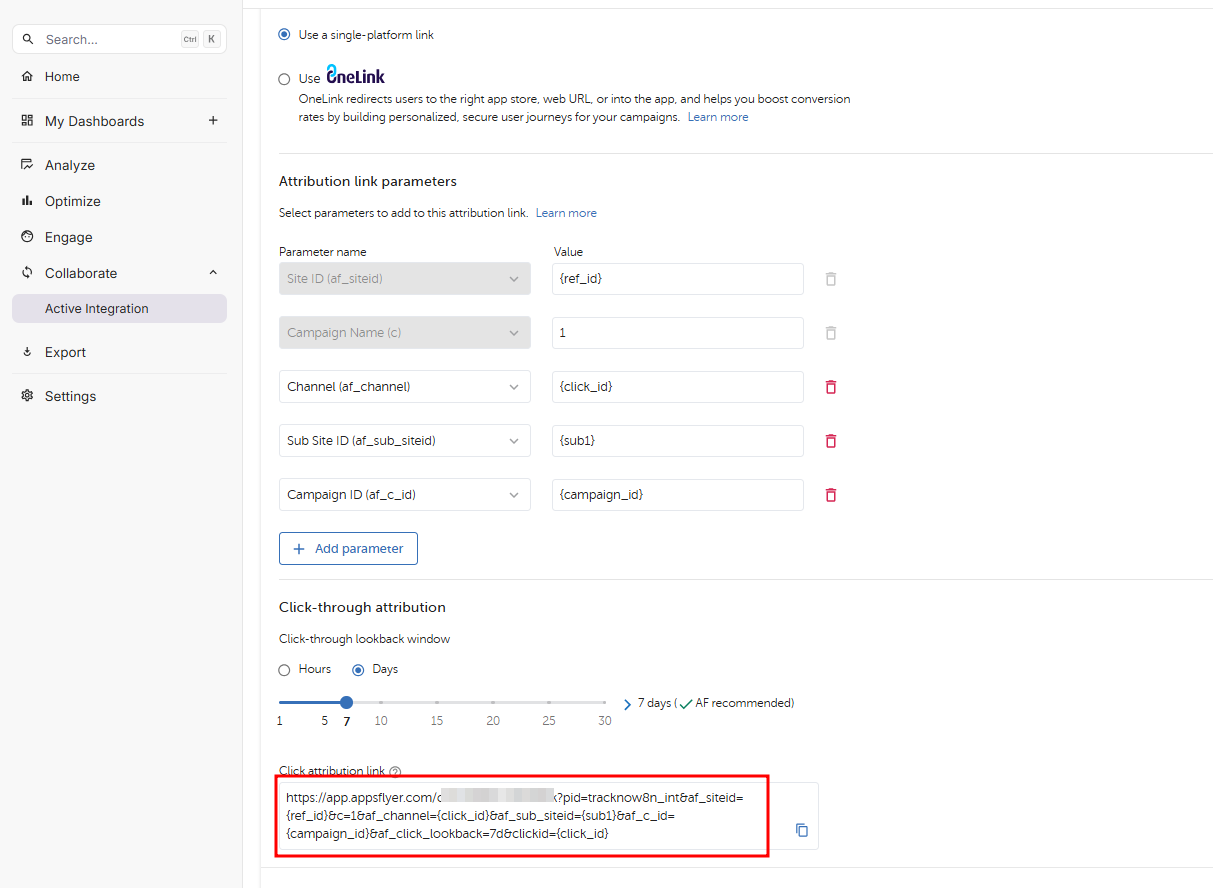
Active Advertiser Integration
https://app.appsflyer.com/yourappid?pid=tracknow8n_int&af_siteid={ref_id}&c=1&af_channel={click_id}&af_sub_siteid={sub1}&af_c_id={campaign_id}&af_click_lookback=7d&clickid={click_id}
Replace the values below:
| Value | Description |
|---|---|
[APP_ID] | The AppsFlyer App ID |
[APPSFLYER_PID] | Your AppsFlyer Partner ID |
{click_id} | Tracknow unique click ID macro |
{affiliate_id} | Tracknow affiliate ID macro |
{campaign_id} | Tracknow campaign ID macro |
{sub1} | Tracknow sub1 |
Example:
https://app.appsflyer.com/com.example.app?pid=yourpartner_int&clickid={click_id}&af_siteid={affiliate_id}&af_c_id={campaign_id}
The clickid parameter is required because AppsFlyer must return the Tracknow click ID in the postback.
For the full list of AppsFlyer attribution link parameters, see AppsFlyer’s official documentation:
AppsFlyer attribution link parameters
Recommended AppsFlyer Attribution Parameters
| AppsFlyer Parameter | Tracknow Macro | Description |
|---|---|---|
pid | Your AppsFlyer Partner ID | Identifies you as the partner in AppsFlyer |
clickid | {click_id} | Unique Tracknow click ID |
af_siteid | {ref_id} | Affiliate ID in Tracknow |
af_sub_siteid | {sub1} | Optional sub ID |
af_c_id | {campaign_id} | Campaign ID in Tracknow |
Integrating Install and In-App Event Postbacks
AppsFlyer should send install and in-app event postbacks to Tracknow using your Tracknow postback URL.
You must send AppsFlyer your custom Tracknow tracking domain in place of REPLACEME-tracking.tracknow.info.
Global Install Postback
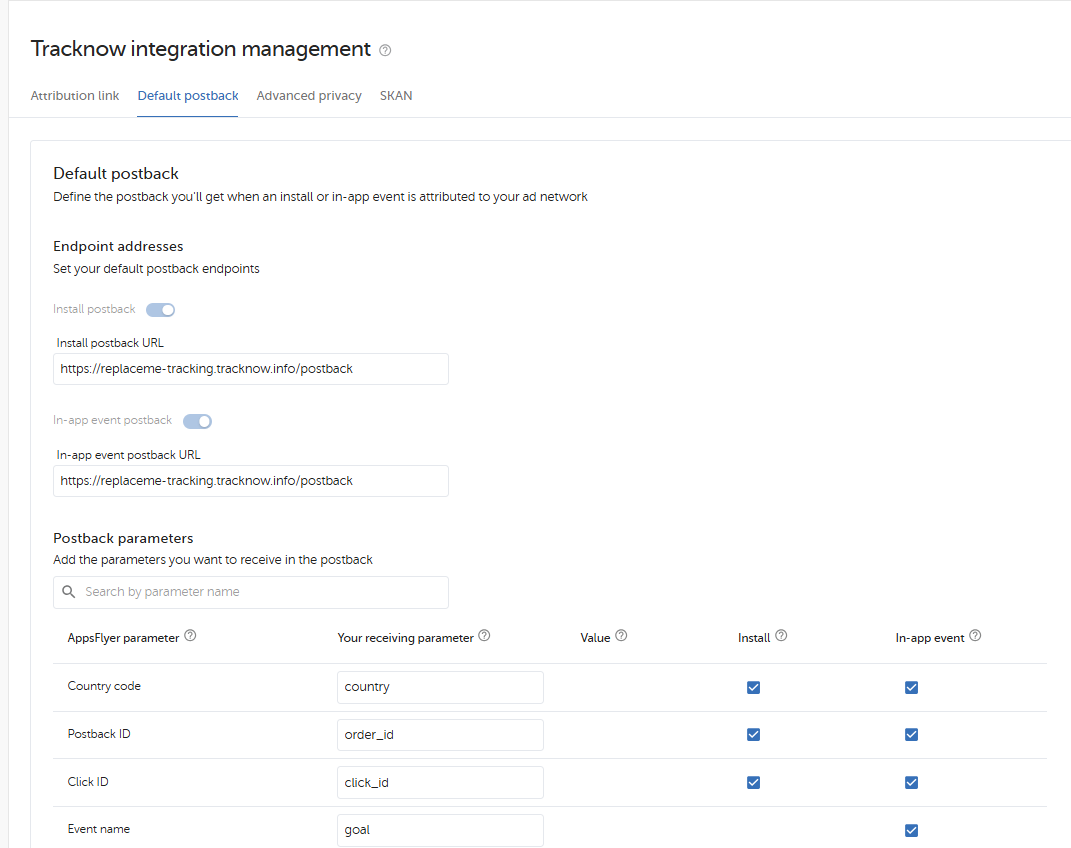
Partner Integration Screen (Your App)
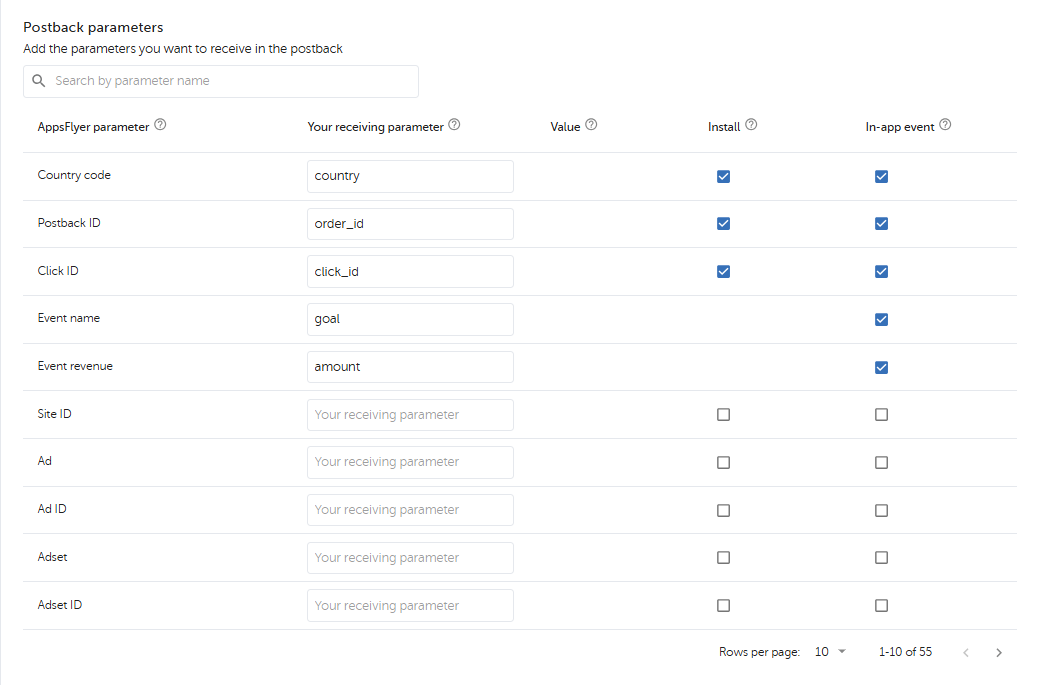
Partner Integration Screen (Your App)
Install postback URL & In-app event postback URL:
https://REPLACEME-tracking.tracknow.info/postback
| Tracknow Parameter | AppsFlyer Macro | Description |
|---|---|---|
click_id | {Click ID} | Unique Tracknow click ID returned by AppsFlyer |
goal | {Event name} | Tracknow goal name or event identifier |
amount | {Event revenue} | Event Order Amount |
country | {Country code} | Event Country Code |
Global In-App Event Postback
For in-app events, AppsFlyer should send the event name or mapped event ID to Tracknow.
In-app event postback example:
https://REPLACEME-tracking.tracknow.info/postback?click_id={Click ID}&goal={Event name}
The mapped-iae macro returns the mapped AppsFlyer in-app event value.
| Tracknow Parameter | AppsFlyer Macro | Description |
|---|---|---|
click_id | {Click ID} | Unique Tracknow click ID |
goal | {Event name} | AppsFlyer mapped in-app event value |
campaign_id | {Campaign ID} |
Example event name mapping:
| AppsFlyer Event | Tracknow Goal |
|---|---|
af_complete_registration | registration |
af_purchase | purchase |
af_subscribe | subscription |
first_deposit | first_deposit |
kyc_approved | kyc_approved |
Make sure the value sent by AppsFlyer matches the goal configured in Tracknow.
Advanced Additions for AppsFlyer Attribution Links
Additional Postbacks
If you are an existing AppsFlyer partner and you are migrating from another platform to Tracknow, add the following parameter to your AppsFlyer attribution links:
&af_additional_postback=1
Example:
https://app.appsflyer.com/com.example.app?pid=yourpartner_int&clickid={click_id}&af_siteid={affiliate_id}&af_c_id={campaign_id}&af_cost_model=CPA&af_additional_postback=1
Use this when more than one postback URL should fire for the same transaction.
Disable Install Postback
If you only want to receive postbacks for AppsFlyer events and do not want to receive install postbacks, add:
&af_installpostback=false
Example:
https://app.appsflyer.com/com.example.app?pid=yourpartner_int&clickid={click_id}&af_siteid={ref_id}&af_c_id={campaign_id}&af_installpostback=false
Use this only when installs should not be tracked in Tracknow.
AppsFlyer Event Troubleshooting
There are four main parts to confirm when checking whether the AppsFlyer integration is set up correctly.
1. Event Creation in Tracknow
Confirm that the required goals or events exist in Tracknow.
Examples:
- Install
- Registration
- Purchase
- First Deposit
- Subscription
- KYC Approved
- Custom in-app event
The goal name in Tracknow should match the value sent from AppsFlyer in the postback.
2. Default Landing Page
Confirm that the Tracknow campaign default landing page is the AppsFlyer attribution link.
Example:
https://app.appsflyer.com/[APP_ID]?af_siteid={ref_id}&af_sub_siteid={sub2}&pid=[APPSFLYER_PID]&clickid={click_id}&af_c_id={campaign_id}
Common AppsFlyer parameters:
| AppsFlyer Parameter | Tracknow Macro | Definition |
|---|---|---|
af_siteid | {ref_id} | ID of the affiliate in Tracknow |
af_sub_siteid | {sub1} | Sub ID from the affiliate tracking URL |
pid | Your AppsFlyer Partner ID | Partner ID from AppsFlyer |
clickid | {click_id} | Unique Tracknow click ID |
af_c_id | {campaign_id} | Campaign ID from Tracknow |
3. AppsFlyer In-App Event Postback
If you do not have access to the AppsFlyer event postback screen, ask the advertiser to confirm the setup with a screenshot.
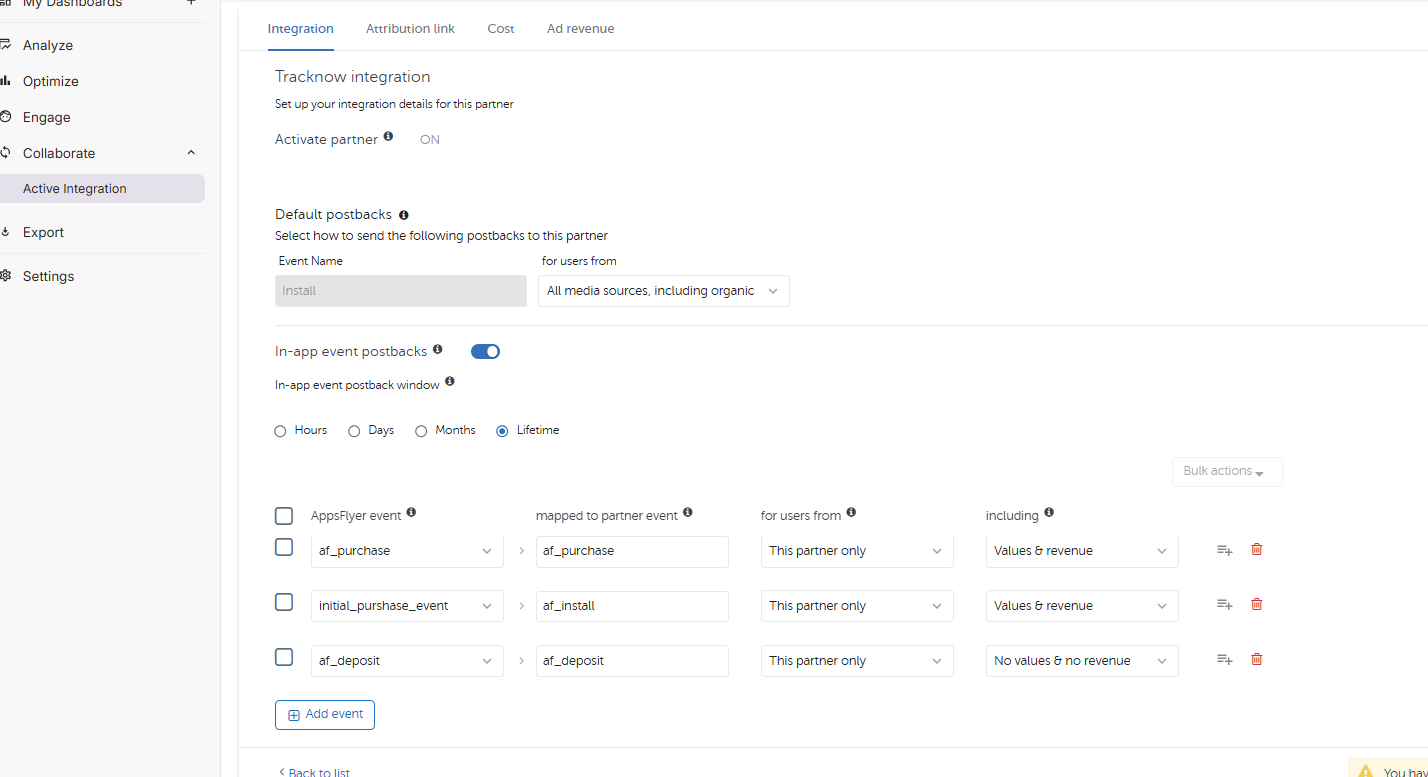
The Partner Event Identifier should correspond with the Tracknow goal value that should be recorded for the conversion.
Example:
https://REPLACEME-tracking.tracknow.info/postback?click_id={Click ID}&goal={Event name}
4. Tracknow Postback
Confirm that AppsFlyer is sending the correct postback to Tracknow.
Install example:
https://REPLACEME-tracking.tracknow.info/postback?click_id={Click ID}&order_id={Postback ID}&goal=install
In-app event example:
hhttps://REPLACEME-tracking.tracknow.info/postback?click_id={Click ID}&order_id={Postback ID}&goal={Event name}
Revenue event example:
https://REPLACEME-tracking.tracknow.info/postback?click_id={Click ID}&goal=purchase&amount={Event revenue}&order_id={Postback ID}
Advanced Privacy
The Advanced Privacy postback mechanism may apply when all of the following are true:
- The user’s device is running iOS 14.5+
- Apple’s App Tracking Transparency, ATT, applies
- Advanced Privacy is enabled in AppsFlyer
Advanced Privacy postbacks may be clickless. This means Tracknow may need fallback values such as affiliate ID and campaign ID to attribute the conversion correctly.
To support this, include the same fallback values in both the AppsFlyer attribution link and the AppsFlyer postback URL.
Attribution Link Example
https://app.appsflyer.com/com.example.app?pid=yourpartner_int&clickid={click_id}&af_siteid={ref_id}&af_c_id={campaign_id}
Advanced Privacy Postback Example
https://REPLACEME-tracking.tracknow.info/postback?click_id={Click ID}&ref_id={af_siteid}&campaign_id={af_c_id}&goal=install
Fallback parameters:
| Tracknow Parameter | AppsFlyer Macro |
|---|---|
click_id | {click_id} |
ref_id | {af_siteid} |
campaign_id | {af_c_id} |
If no click ID is available, Tracknow may rely on the available fallback values, depending on the campaign configuration.
For complete details, review the AppsFlyer resources:
Sample Setup
Tracknow Default Landing Page
https://app.appsflyer.com/[APP_ID]?pid=[APPSFLYER_PID]&clickid={click_id}&af_siteid={ref_id}&af_c_id={campaign_id}
Install Postback
https://YOUR_TRACKNOW_DOMAIN/postback?click_id=$$click(clickid)&goal=install
In-App Event Postback
https://REPLACEME-tracking.tracknow.info/postback?click_id={Click ID}&goal={Event name}
Purchase Event with Revenue
https://REPLACEME-tracking.tracknow.info/postback?click_id={Click ID}&goal=purchase&amount={Event revenue}
Testing the Integration
Before launching live traffic, test the full flow.
Recommended test flow:
- Confirm the advertiser invited you as a partner in AppsFlyer.
- Confirm the AppsFlyer attribution link includes the Tracknow macros.
- Add the AppsFlyer attribution link as the campaign default landing page in Tracknow.
- Generate a Tracknow affiliate tracking link.
- Click the Tracknow tracking link.
- Confirm the redirect reaches AppsFlyer.
- Complete the app install or in-app event.
- Confirm the event appears in AppsFlyer.
- Confirm the postback is received in Tracknow.
- Confirm the conversion is attributed to the correct affiliate and campaign.
Troubleshooting
The conversion was not received in Tracknow
Check the following:
- The advertiser invited you as a partner in AppsFlyer.
- The AppsFlyer postback URL is active.
- The postback URL uses the correct Tracknow domain.
- The AppsFlyer event is enabled for postbacks.
- The event name matches the Tracknow goal.
- The campaign is active in Tracknow.
- The affiliate is approved for the campaign.
The conversion was received but was not assigned to an affiliate
This usually means the click ID was missing or incorrect.
Check that the AppsFlyer attribution link includes:
clickid={click_id}
And that the AppsFlyer postback sends it back as:
click_id={Click ID}
In-app events are not tracked
Check the following:
- The in-app event exists in AppsFlyer.
- The event is enabled for postbacks.
- The AppsFlyer event is mapped to the correct Tracknow goal.
- The postback includes the event name or mapped event ID.
Example:
goal={Event name}
Revenue is missing
Check that the postback includes the AppsFlyer revenue and currency macros:
amount={Event revenue}
Also confirm that the AppsFlyer event contains revenue data.
Important Notes
- The advertiser must invite you as a partner in AppsFlyer before the integration can be completed.
- To update an existing AppsFlyer integration, contact
[email protected]. - The
clickidparameter is required for accurate click-based attribution. - Goal names in Tracknow should match the event values sent from AppsFlyer.
- If revenue is required, AppsFlyer must send both amount and currency.
- During migration, additional postback settings may be required.
- Always test the full tracking flow before launching live traffic.