> For the complete documentation index, see [llms.txt](https://docs.tracknow.io/llms.txt). Markdown versions of documentation pages are available by appending `.md` to page URLs; this page is available as [Markdown](https://docs.tracknow.io/engagement-hub/guides.md).

# Guides

**Guides** is a dedicated section where you can create and manage documentation, instructions, and other resources for your affiliates.

Each guide can be displayed only to specific affiliates by defining its visibility scope:

* **Campaign Scope** – Select one or more campaigns to make the guide available only to affiliates participating in those campaigns.
* **Affiliate Group Scope** – Select one or more affiliate groups to make the guide available only to affiliates who belong to those groups.

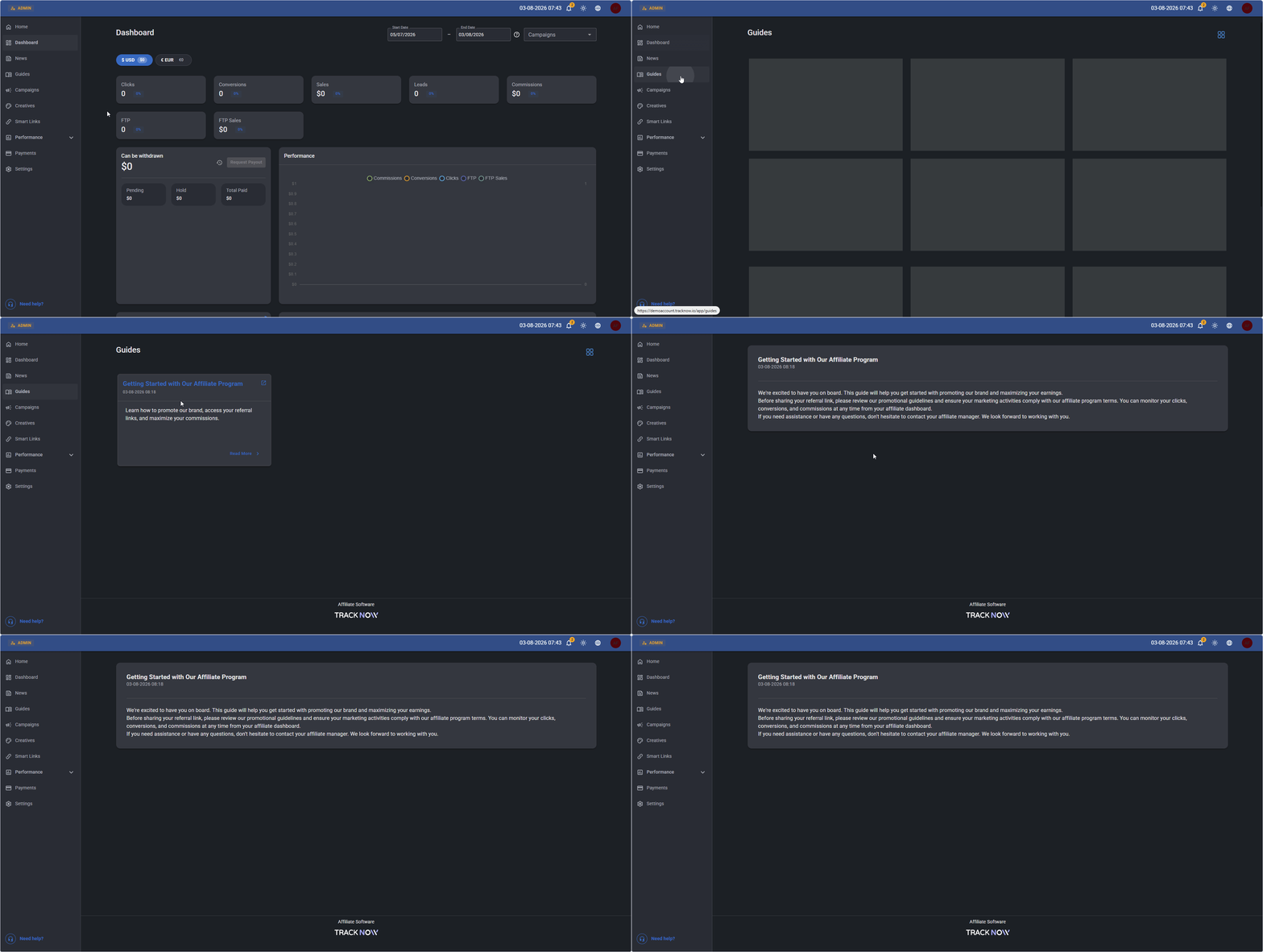
Once the first guide is created and its status is set to **Active**, a new **Guides** section will automatically appear in the affiliate portal, allowing eligible affiliates to access the guides available to them.

***

## Adding Guides

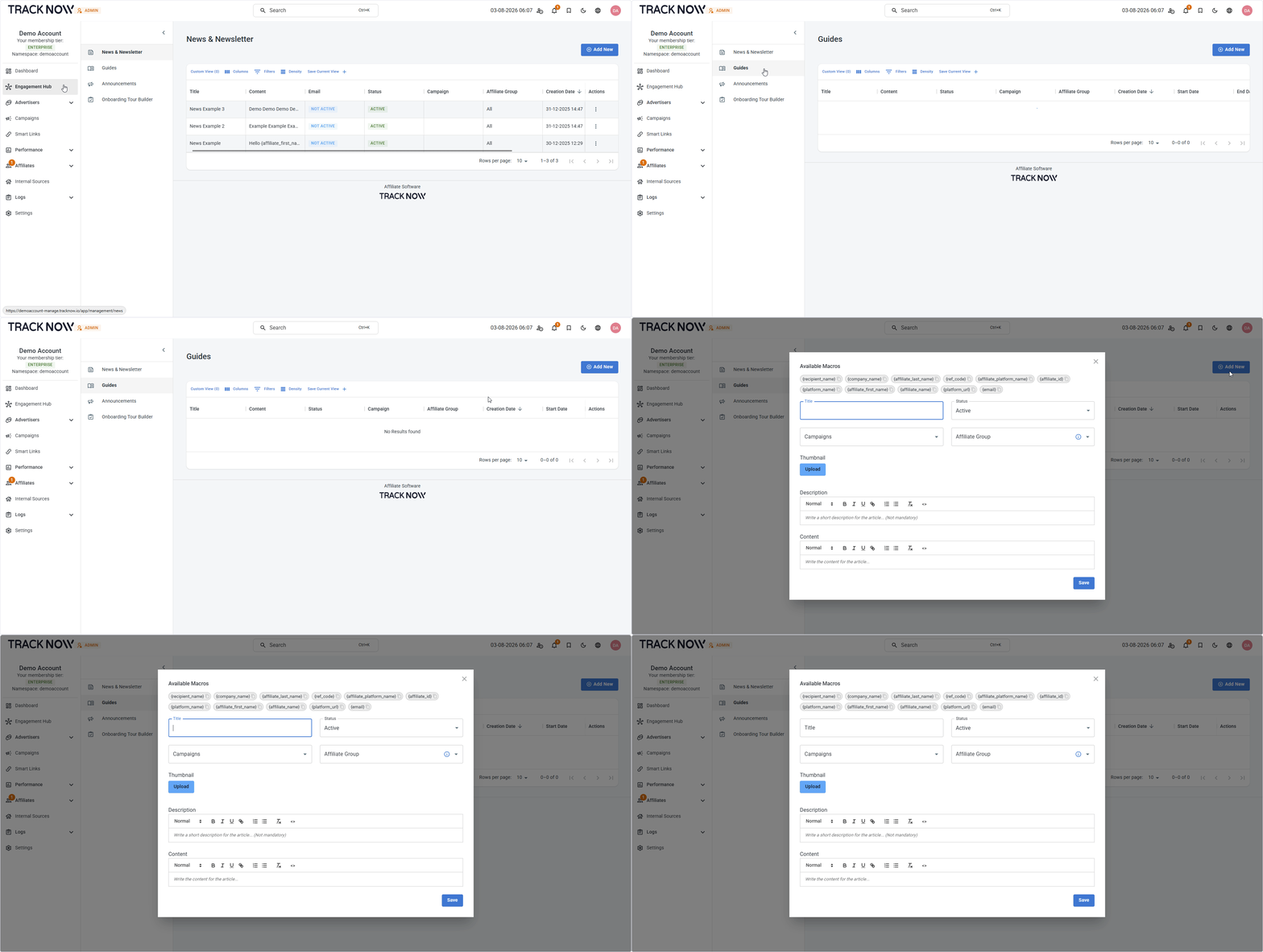
Navigate to:\
**Engagement Hub** → **Guides** → **Add New**

<figure><img src="/files/s5cJYKwhuTOVbDorM54E" alt=""><figcaption></figcaption></figure>

### Configuration

<figure><img src="/files/F1JdWbLaTymnbUKAhhZ8" alt=""><figcaption></figcaption></figure>

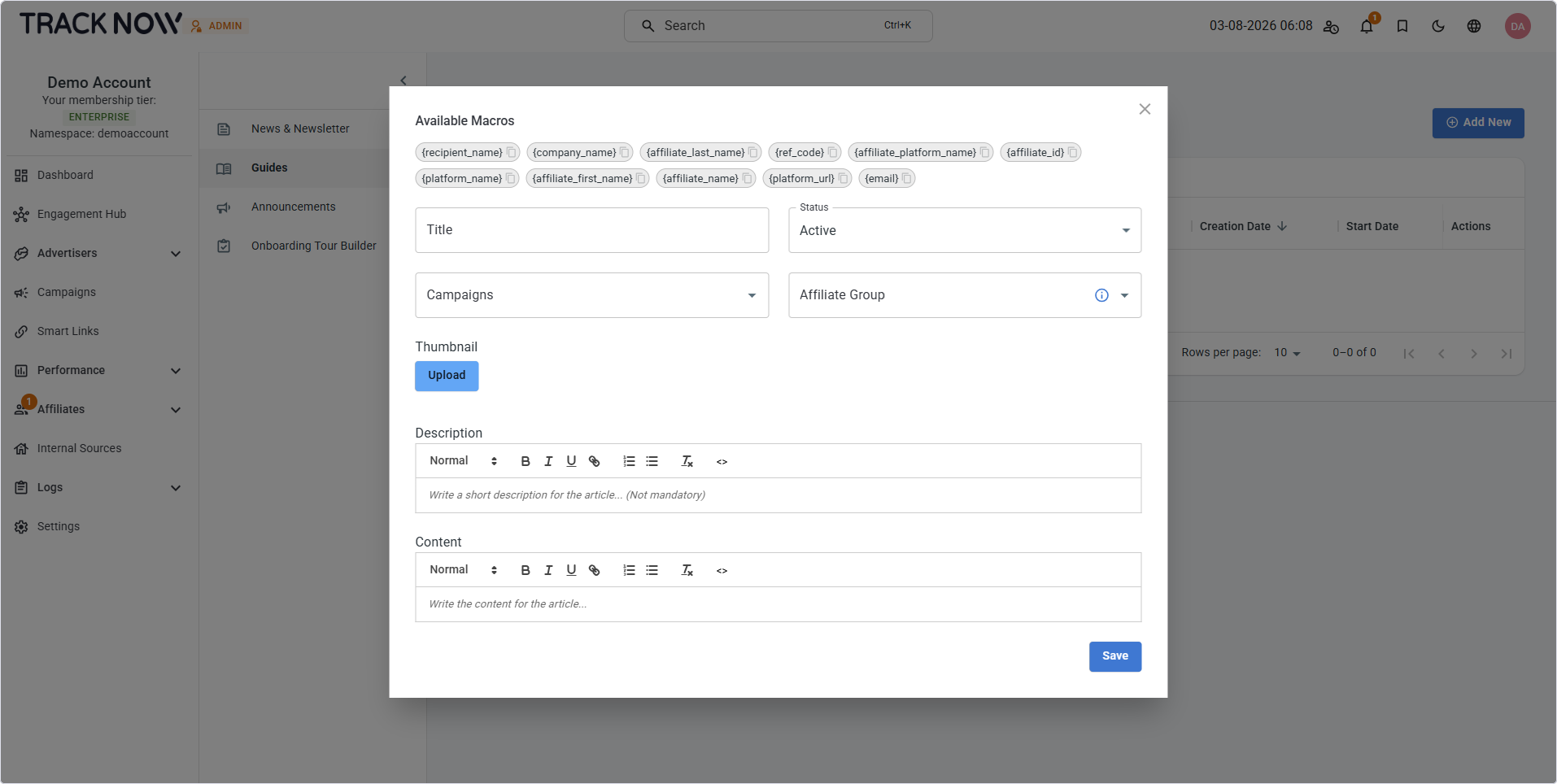
<table><thead><tr><th width="239">Field</th><th>Description</th></tr></thead><tbody><tr><td><strong>Available Macros</strong> (Optional)</td><td>Tracknow placeholders that are automatically replaced with affiliate-specific values when the guide is displayed, allowing you to personalize its content for each affiliate.</td></tr><tr><td><strong>Title</strong> (Required)</td><td>Set a title for the guide item. (Visible to affiliates).</td></tr><tr><td><strong>Status</strong> (Required)</td><td>Set the status of the guide item.</td></tr><tr><td><strong>Campaigns</strong> (Optional)</td><td>Select one or more campaigns to make this guide available only to affiliates participating in the selected campaigns. Leave empty to include all campaigns.</td></tr><tr><td><strong>Affiliate Group</strong> (Optional)</td><td>Select one or more affiliate groups to make this guide available only to affiliates participating in the selected groups. Leave empty to include all groups.</td></tr><tr><td><strong>Thumbnail</strong> (Optional)</td><td>Upload a thumbnail for the guide preview. (Visible to affiliates).</td></tr><tr><td><strong>Description</strong> (Optional)</td><td>Set a short description for the guide preview (Visible to affiliates).</td></tr><tr><td><strong>Content</strong> (Required)</td><td>Add the content of the guide.</td></tr></tbody></table>

#### Available Macros

<table><thead><tr><th width="243">Macro</th><th width="239">Description</th><th>Example</th></tr></thead><tbody><tr><td><strong><code>{affiliate_first_name}</code></strong></td><td>Affiliate's first name</td><td>John</td></tr><tr><td><strong><code>{affiliate_last_name}</code></strong></td><td>Affiliate's last name</td><td>Doe</td></tr><tr><td><strong><code>{affiliate_name}</code></strong></td><td>Affiliate's full name</td><td>John Doe</td></tr><tr><td><strong><code>{affiliate_id}</code></strong></td><td>Tracknow affiliate ID</td><td>4</td></tr><tr><td><strong><code>{email}</code></strong></td><td>Affiliate's email address</td><td>john@example.com</td></tr><tr><td><strong><code>{ref_code}</code></strong></td><td>Affiliate's MLM referral code</td><td>ksBAKI</td></tr><tr><td><strong><code>{affiliate_platform_name}</code></strong></td><td>The Affiliate Portal Name configured under <em>Settings → Branding</em></td><td>Affiliate Portal</td></tr><tr><td><strong><code>{company_name}</code></strong></td><td>The Company Name configured under <em>Settings</em> → <em>Company Settings</em></td><td>Tracknow</td></tr><tr><td><strong><code>{platform_url}</code></strong></td><td>Affiliate login page URL</td><td>https://aff.example.com/login</td></tr></tbody></table>

#### Statuses

<table><thead><tr><th width="94">Status</th><th>Description</th></tr></thead><tbody><tr><td><strong>Active</strong></td><td>Makes the guide visible to eligible affiliates in the affiliate portal.</td></tr><tr><td><strong>Draft</strong></td><td>Saves the guide without making it visible to affiliates.</td></tr><tr><td><strong>Inactive</strong></td><td>Hides the guide from affiliates.</td></tr></tbody></table>

***

### Affiliate Access

Affiliates can access the guides available to them by going to the **Guides** page:

<figure><img src="/files/zbaHEpRY2w7k3QAr08w6" alt=""><figcaption></figcaption></figure>


---

# Agent Instructions
This documentation is published with GitBook. GitBook is the documentation platform designed so that both humans and AI agents can read, navigate, and reason over technical content effectively. Learn more at gitbook.com.

## Querying This Documentation
If you need additional information that is not directly available in this page, you can query the documentation dynamically by asking a question.

Perform an HTTP GET request on the current page URL with the `ask` query parameter, and the optional `goal` query parameter:

```
GET https://docs.tracknow.io/engagement-hub/guides.md?ask=<question>&goal=<endgoal>
```

`ask` is the immediate question: it should be specific, self-contained, and written in natural language.
`goal` is optional and describes the broader end goal you are ultimately trying to accomplish on behalf of the user. GitBook uses it to tailor the answer towards what is most useful for that goal.

The response will contain a direct answer to the question and relevant excerpts and sources from the documentation.

Use this mechanism when the answer is not explicitly present in the current page, you need clarification or additional context, or you want to retrieve related documentation sections.