> For the complete documentation index, see [llms.txt](https://docs.tracknow.io/llms.txt). Markdown versions of documentation pages are available by appending `.md` to page URLs; this page is available as [Markdown](https://docs.tracknow.io/engagement-hub/announcements.md).

# Announcements

**Announcements** allow you to display informational banners on the Affiliate Portal to communicate important updates with your affiliates.

You can use announcements to notify affiliates about changes that may affect them or actions they need to take. For example, you can inform them when a new required document has been added and needs to be uploaded.

***

## Permission Requirements

There are two permissions that can affect a manger's ability to create/edit/view announcements:

* **Affiliate Announcements** - This permission allows managers to create and edit their own announcements. Disabling this permission hides the Announcements page from the manager
* **Manage All Announcements** - This permission allows managers to create and edit all announcements. \
  ***Note:** When editing an announcement created by another manager, the **Audience** setting cannot be modified.*

***

## Adding Announcements

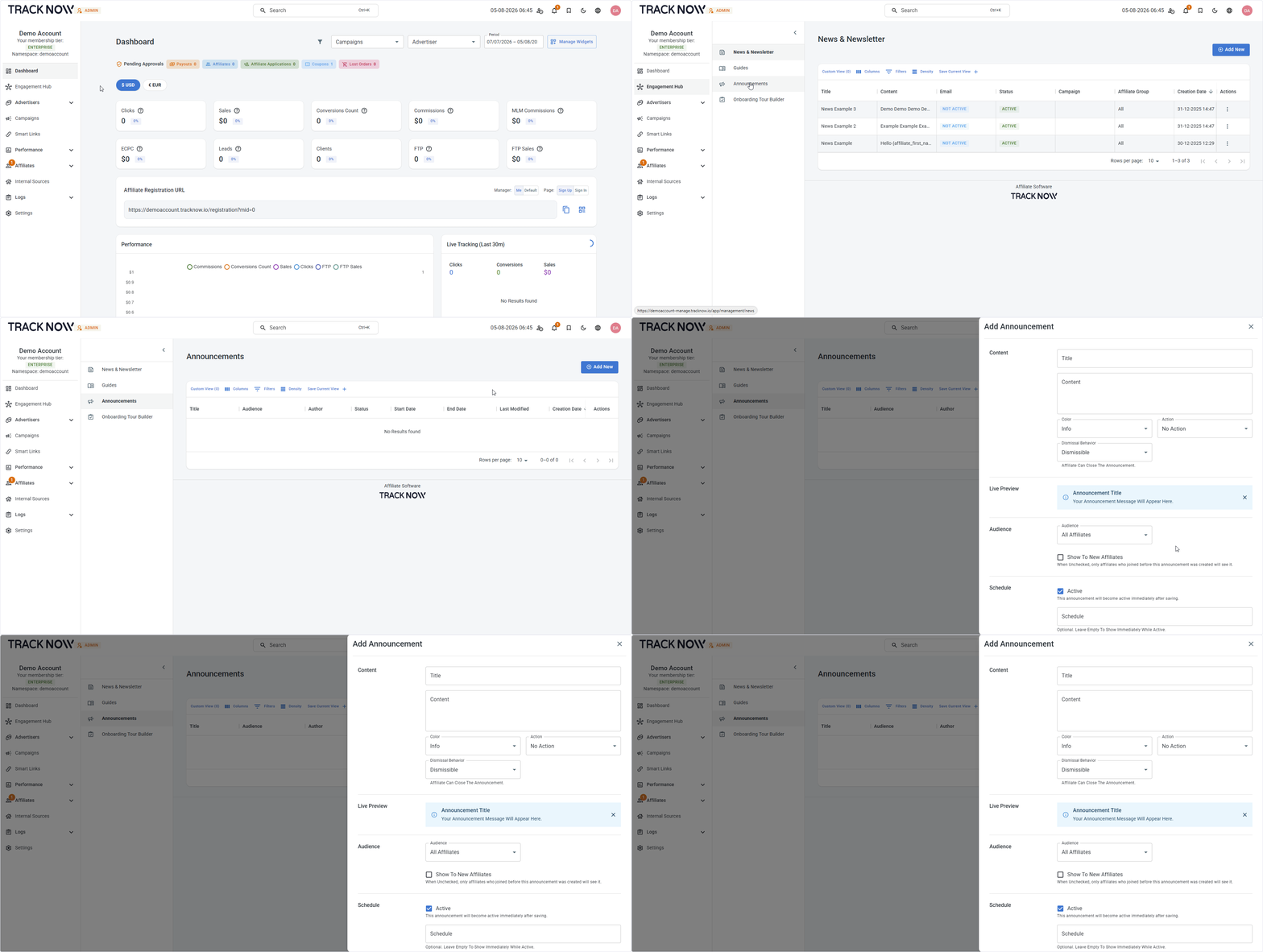
Navigate to:\
**Engagement Hub** → **Announcements** → **Add New**

<figure><img src="/files/KxdJ9fKB5zG8axcpdoCD" alt=""><figcaption></figcaption></figure>

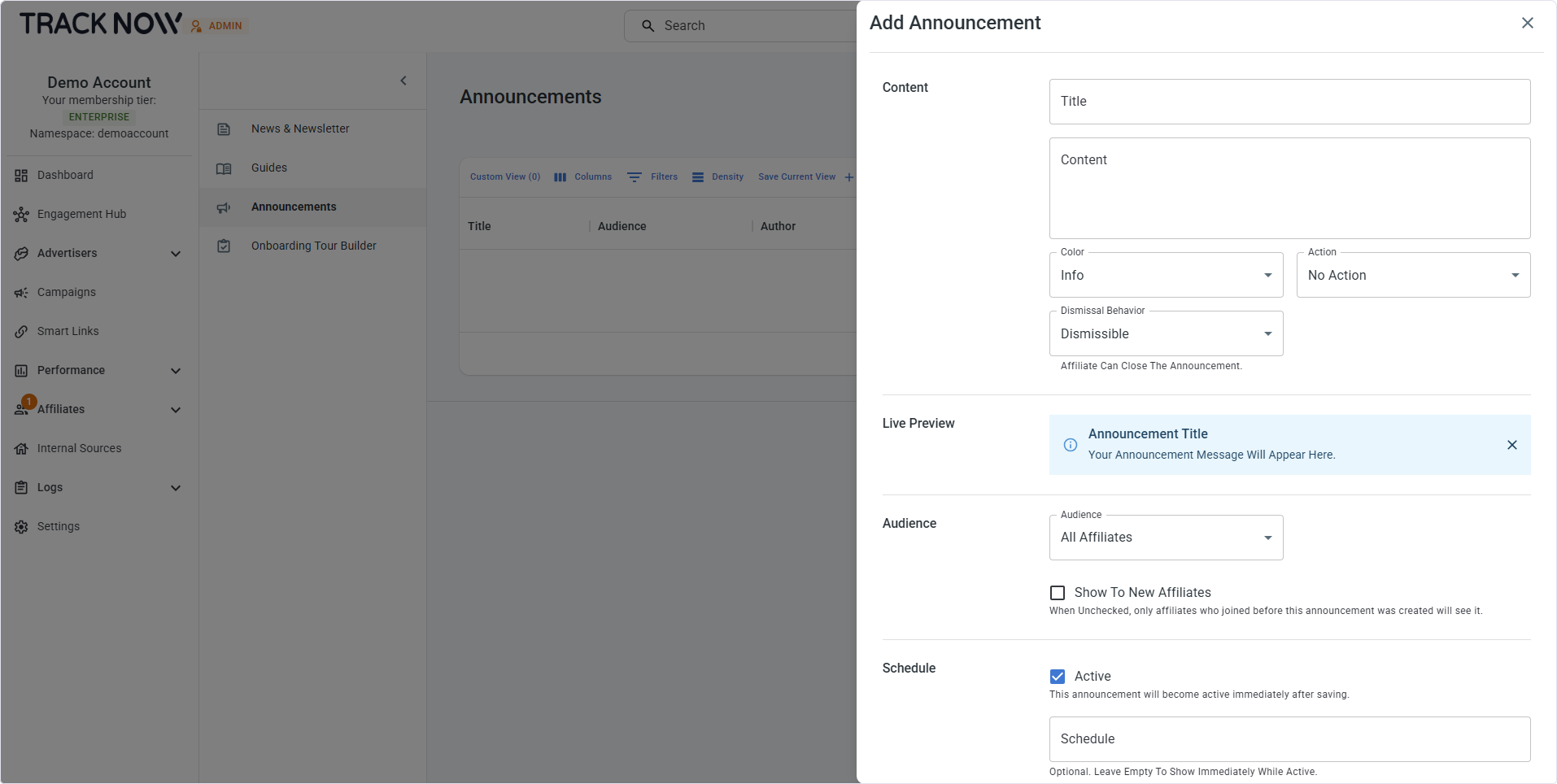
### Configuration

<figure><img src="/files/m533ikkOv2W6cANnFdAy" alt=""><figcaption></figcaption></figure>

<table><thead><tr><th width="208">Field</th><th>Description</th></tr></thead><tbody><tr><td><strong>Title</strong> (Required)</td><td>Set a title for the announcement.</td></tr><tr><td><strong>Content</strong> (Required)</td><td>Set the content of the announcement.</td></tr><tr><td><strong>Color</strong></td><td>Select the banner color </td></tr><tr><td><strong>Action</strong></td><td>Predefined buttons that direct affiliates to a specific page. <a href="#action-buttons">See Actions below for details.</a></td></tr><tr><td><strong>Dismissal Behavior</strong></td><td>Choose whether affiliates can dismiss this announcement</td></tr><tr><td><strong>Preview</strong></td><td>A live preview of the banner</td></tr><tr><td><strong>Audience</strong></td><td>Select whether this announcement is visible to all affiliates or only to targeted affiliates</td></tr><tr><td><strong>Show to new affiliates</strong></td><td>Show this announcement to future affiliates who match the targeting criteria</td></tr><tr><td><strong>Active</strong></td><td>Activate the announcement to make it visible to affiliates</td></tr><tr><td><strong>Schedule</strong></td><td>Set a start and end date to display the announcement for a limited time</td></tr></tbody></table>

### Action Buttons

<table><thead><tr><th width="160">Button</th><th>Description</th></tr></thead><tbody><tr><td>Complete KYC</td><td>Banner button that directs the affiliate to the required documents page</td></tr><tr><td>View Campaign</td><td>Banner button to that directs the affiliate to a specific campaign page</td></tr><tr><td>Custom Action</td><td>Banner button to that directs the affiliate to a custom page you select</td></tr></tbody></table>


---

# Agent Instructions
This documentation is published with GitBook. GitBook is the documentation platform designed so that both humans and AI agents can read, navigate, and reason over technical content effectively. Learn more at gitbook.com.

## Querying This Documentation
If you need additional information that is not directly available in this page, you can query the documentation dynamically by asking a question.

Perform an HTTP GET request on the current page URL with the `ask` query parameter, and the optional `goal` query parameter:

```
GET https://docs.tracknow.io/engagement-hub/announcements.md?ask=<question>&goal=<endgoal>
```

`ask` is the immediate question: it should be specific, self-contained, and written in natural language.
`goal` is optional and describes the broader end goal you are ultimately trying to accomplish on behalf of the user. GitBook uses it to tailor the answer towards what is most useful for that goal.

The response will contain a direct answer to the question and relevant excerpts and sources from the documentation.

Use this mechanism when the answer is not explicitly present in the current page, you need clarification or additional context, or you want to retrieve related documentation sections.