Custom Email Address
Tracknow offers the option to send automatic emails to your affiliates after various events such as registration, payment request approval/denial, campaign join request approval/denial.
You can set a custom email address for such emails.
By default, the email address from which the emails are sent is a Tracknow email address.
If you'd like to further customize and brand you portal, you can have the email address appear as your brands email address.
| Default email address | Custom email address |
|---|---|
| [email protected] | [email protected] |
Prerequisites
In order to set up a custom email, you'll need to add several DNS records to your domain hosting service (i.e. GoDaddy, Cloudflare, Google Domains).
The DNS records are generated by us manually. To receive these records, you need to contact our support team. You can copy and fill out the following template and send it to [email protected]
Hello,

I would like to set up a custom email address with my domain.
Please provide me the necessary DNS records based on the following information:
- The email address I want is: *Enter desired email address (Example: [email protected])*

Thanks.
Once the records are generated, they are valid for 72 hours. If the process has not been completed by then, we'll need to generate new records for you.
Setting Up the DNS Records
- Navigate to the area where you manage your DNS records
- Create a new DNS record of the CNAME type
- On the 'Name' field enter the name value from the file (i.e. 5k4aehnksge._domainkey.your-domain.com)
- On the 'Value' field enter the value from the file (i.e 5k4aehnksge.dkim.amazonses.com)
- If given the option to configure proxy status, select 'DNS Only'
- Save the record
- Repeat this process for all 3 records in the file
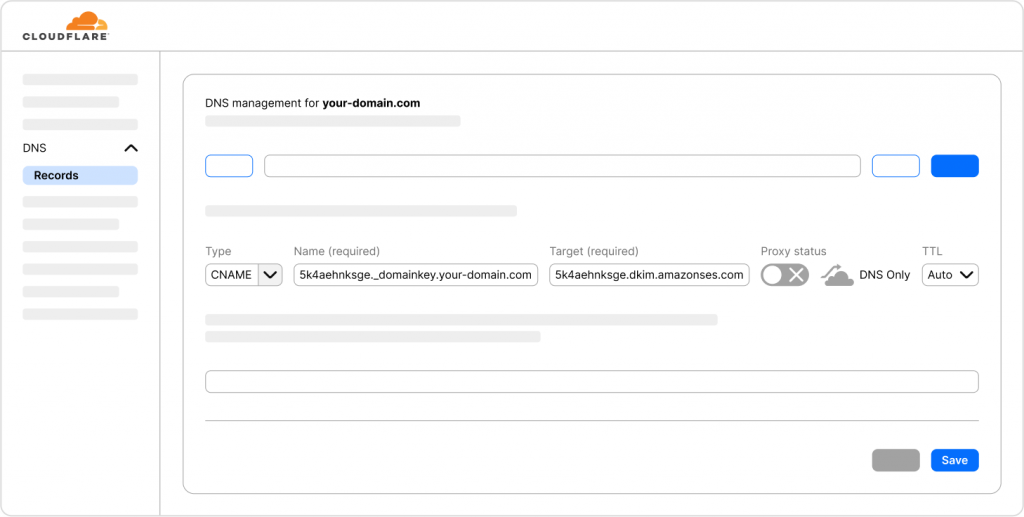
Once you are done, please send us another email notifying us that you are done so that we can finalize the setup on our end